

Last month I tried to “standardize” on one AI for our team. By day three, my neat spreadsheet was ruined by reality: a sales email that needed warmth, a bug fix that needed precision, and a 40-page doc that needed a brain with stamina. So instead of crowning a winner, I started treating ChatGPT vs Gemini vs Claude 3.5 Sonnet like hiring three specialists—then watching who actually showed up when it mattered.
My “Best AI Comparison” rule: test the ugly tasks
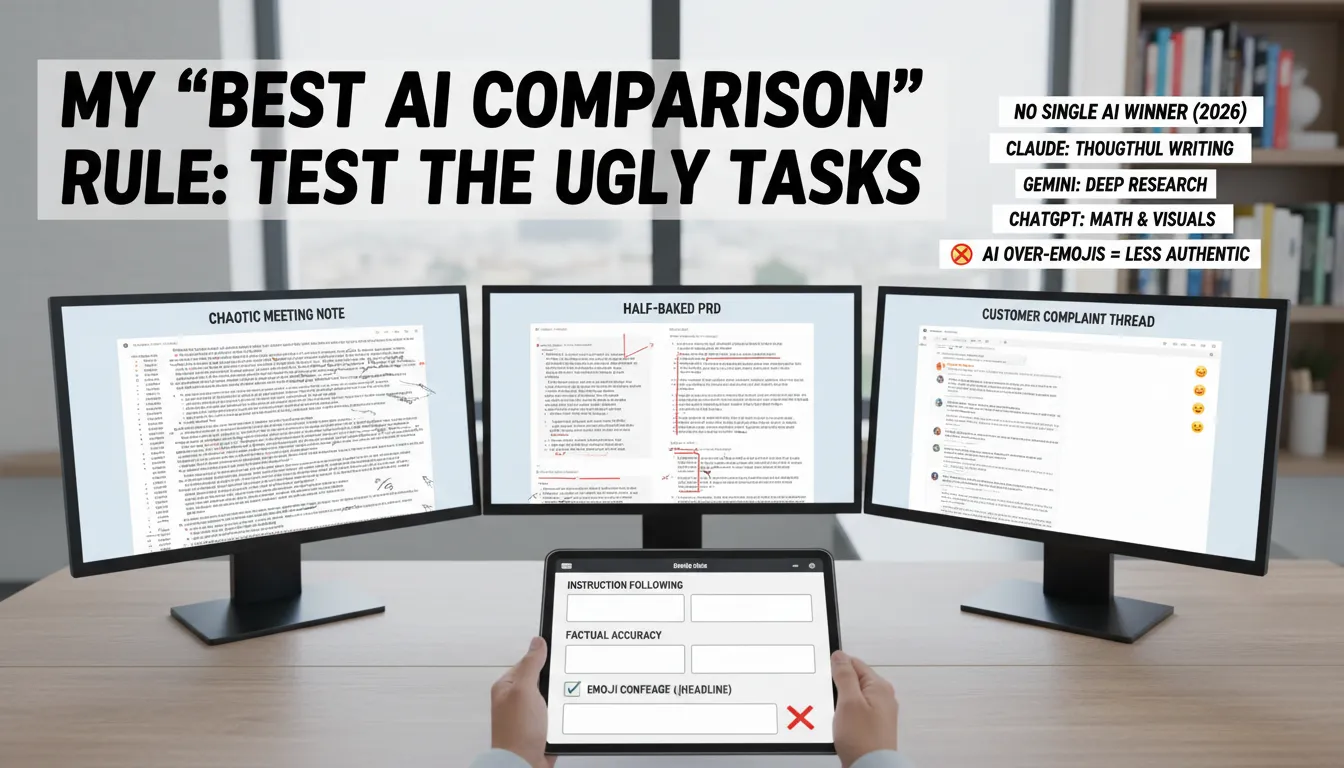
My Best AI Comparison rule is simple: don’t test with polished prompts. I run the same three messy, real workflows across ChatGPT, Claude, and Gemini, because business work is rarely clean. This is how I make an AI Model Choice for customer service, content creation, data analysis, marketing analytics, and conversion optimization—based on what actually ships, not generic benchmarks.
The three workflows I reuse in every AI Comparison 2026
A chaotic meeting note (interruptions, action items, unclear owners)
A half-baked PRD (missing requirements, fuzzy success metrics)
A customer complaint thread (emotion, policy constraints, edge cases)
Then I judge outputs like a manager would: can I paste this into an email, ticket, doc, or dashboard without babysitting it?
My qualitative rubric (no vanity scores)
Instruction Following: Did it follow the format, tone, and constraints?
Factual Accuracy: Did it invent details, numbers, or policies?
Natural Language: Does it sound like a person I’d hire?
Implementation readiness: Are next steps specific enough to execute?
Quick aside: if the headline arrives with a confetti-cannon of emojis, I dock points. In 2026, all the major models still overuse emojis in headlines, and it’s a tell in client-facing content that reduces authenticity.
What I typically see across models
There’s no single winner in 2026. Claude tends to shine on thoughtful writing and analysis. Gemini is often strongest for deep research. ChatGPT is usually my pick for math and visuals. The point isn’t a universal ranking—it’s matching the model to the workflow under real constraints.
April Dunford: "Positioning is not what you say; it’s what they hear."
That quote is why I test “ugly tasks”: the best output is the one your team and customers actually understand.
ChatGPT vs Claude: where each one feels ‘human’
Claude 3.5 Capabilities: Natural Prose that sounds like me
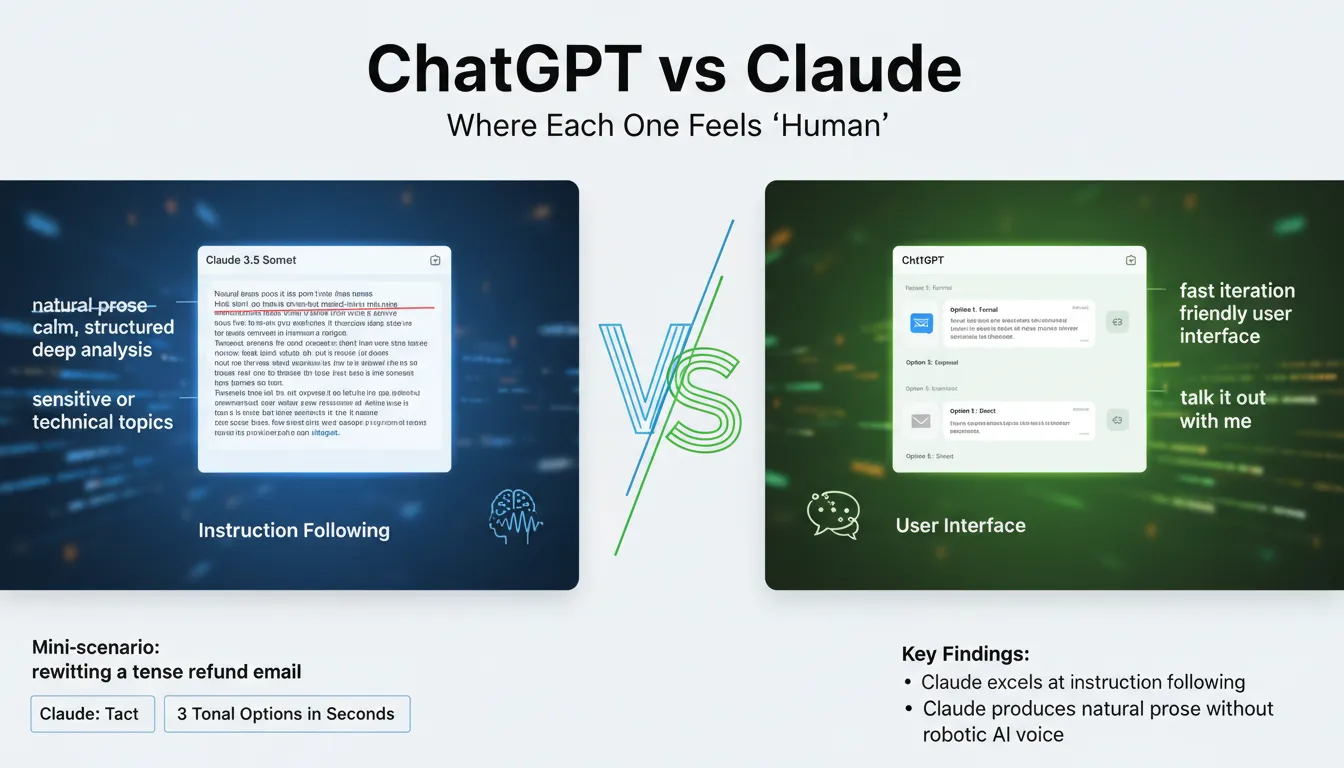
In the ChatGPT vs Claude choice, I reach for Claude 3.5 Sonnet when the writing has to feel calm, tactful, and truly human—think HR drafts, policy updates, or sensitive client comms. Its Instruction Following is strong: when I give a complex prompt with strict formatting (like strikethrough, insertions, and section rules), Claude tends to keep the structure intact instead of “almost” following it. The result is Natural Prose without that robotic AI voice, which helps me keep brand voice consistent across teams.
Deep Analysis with safety and accuracy
For technical or high-stakes topics, Claude’s safety/ethics posture shows up in how it checks claims and avoids overconfident leaps. I notice higher factual care in areas like compliance language, security notes, or product documentation. If I’m asking for code-adjacent help, the reported coding accuracy numbers also nudge me: Claude 3.5 Sonnet at 93.7% vs GPT-4o at 90.2%.
ChatGPT: fast iteration + a friendly User Interface
I keep ChatGPT for speed and flow. The User Interface is easy on web and mobile, which matters when I’m rolling it out to a sales or support team. It’s also hard to beat ChatGPT’s developer APIs for plugging into internal tools, ticketing, and content pipelines. When I need to “talk it out,” ChatGPT feels like a quick brainstorming partner.
Mini-scenario: rewriting a tense refund email
Claude gives me tact: clear apology, firm policy language, and softer phrasing.
ChatGPT gives me three tonal options in seconds (warm, neutral, direct) for tone calibration.
Ethan Mollick: "The real skill isn’t prompting—it’s building a process around the tool."
Gemini Performance: the “Context Window” monster (in a good way)
Gemini Performance for deep research and long-document work
When I’m doing Deep Research or stitching together long docs, Gemini Performance stands out because its Context Window changes the game. With Gemini 1.5 Pro, the Token Capacity reaches 2,000,000 tokens—the largest among mainstream models—so I can drop in an entire book, a long policy pack, or a big codebase and keep the full thread of the work in one place.
How I use the Context Window (my “filing cabinet” workflow)
I treat Gemini like a filing cabinet: I dump in the entire brief, then ask targeted questions instead of re-explaining everything. This is especially helpful for Complex Queries like “find contradictions across these five documents” or “summarize the risks that show up in both the contract and the security review.”
Large uploads for one-pass synthesis (fewer missing details)
Targeted Q&A across the same source set (less backtracking)
Web Search when I need quick external checks or fresh context
Google Ecosystem fit (where it feels “native”)
If you live in the Google Ecosystem—especially Google Workspace—Gemini feels like it belongs there. For business teams already running on Docs, Drive, Gmail, and Sheets, that tight fit can reduce friction when moving from research to drafts to internal sharing.
Reality check: big Token Capacity isn’t perfect judgment
A bigger Context Window doesn’t automatically mean better judgment, so I still spot-check claims, sources, and numbers. Even with strong results like 71.9% coding accuracy, I treat outputs as a fast first pass, not a final answer.
Sundar Pichai: "AI will be the most profound shift of our lifetimes."
Coding Performance + “implementation readiness” (where I trust it)
When I judge Coding Performance, I’m less impressed by flashy demos and more impressed by this: does the patch compile, and does it match my constraints? In business work, “almost right” code still costs time—especially when a small change breaks a build or ignores a key requirement.
Coding Accuracy + Instruction Following (what the numbers say)
On Coding Accuracy, the tests I’ve seen put Claude 3.5 Sonnet at 93.7%, ahead of GPT-4o at 90.2% and Gemini at 71.9%. That lines up with my day-to-day experience: Claude 3.5 Sonnet has been my most reliable for code edits that require careful Instruction Following, like “change this function but keep the interface stable” or “refactor without touching the API response.”
Model | Coding Accuracy |
|---|---|
Claude 3.5 Sonnet | 93.7% |
GPT-4o | 90.2% |
Gemini | 71.9% |
Implementation readiness for Landing Page Creation (shipping matters)
Where Claude stands out most for me is implementation readiness for landing page creation. Marketing teams don’t just need “nice HTML”—they need a page that actually ships: clean structure, sensible CSS, accessible components, and copy that matches the brief. In my tests, Claude is the best at producing a usable first pass for Landing Page Creation with fewer broken layouts and fewer “missing pieces” to chase down.
Kent Beck: "Make it work, make it right, make it fast."
My trust boundaries (and when I switch tools)
Claude for careful edits, specs, and review-friendly diffs.
ChatGPT as a wild card for math, quick data checks, and visuals—then I verify.
Gemini for deep research, but I’m cautious using it as the final coder.
No single AI winner in 2026. For production, I still run unit tests, linting, and human review before merging—every time.
Content Marketing, CRO, and the stuff that pays the bills
Content Marketing + Content Creation (where ChatGPT earns its keep)
For Content Marketing and day-to-day Content Creation, ChatGPT is my go-to when I need relatable customer stories and internal-link-friendly outlines. It “gets” web writing patterns: short sections, clear H2s, and natural places to link to a pricing page, a feature page, or a “compare” post. That matters when I’m trying to connect Marketing Analytics insights (what people read) to what I want them to do next.
Ann Handley: "Good writing is good thinking made visible."
Creating Post
Product launch post: I ask ChatGPT for three angles (problem, proof, payoff) plus suggested internal links.
FAQ page: I have it cluster questions by intent, then I map each cluster to a CTA for Conversion Optimization.
Real World Examples
Case study: ChatGPT drafts a customer narrative that sounds human enough to adapt for Social Media snippets.
Landing Page Creation (Claude stays on the rails)
For Landing Page Creation, Claude is the one I trust to keep structure clean and follow my exact sections without wandering. When I give it a strict template (hero, proof, objections, CTA), it tends to respect it, which makes it feel more implementation-ready for teams that need consistency across pages.
CRO Recommendations (borrow the lesson, even if you don’t use DeepSeek)
On CRO Recommendations, the research insight I lean on is: DeepSeek leads, and Claude follows for enterprise optimization. Even if I’m choosing between ChatGPT, Claude, and Gemini, I copy that approach by prompting for hypotheses + experiments, not “tips.” Example prompt:
Give 5 CRO hypotheses for this page, each with an A/B test, success metric, and risk.
Quick tangent: emoji-heavy H1s kill trust
All models overuse emojis in headlines. I now ban emoji-heavy H1s in drafts—clients notice, even if they can’t name why. It’s a small authenticity signal that supports better Conversion Optimization.
Conclusion: my “three-assistant” stack for 2026
After my failed attempt to standardize on one tool, I stopped asking “which is best?” and started asking a better question for AI Model Choice: which failure mode can I tolerate on this task? That shift is the real lesson from this AI Comparison 2026. In 2026, there is no single winner—only trade-offs you can manage with a clear workflow.
My practical stack (and why it works)
For thoughtful writing, tight instruction following, and careful reasoning, I default to Claude 3.5 Sonnet. It tends to be strong on safety, ethics, and high factual accuracy, especially in technical topics, which makes it my “draft and refine” partner. I still verify key claims, but Claude’s tone and structure help me ship cleaner documents with fewer rewrites.
For deep research and long context, I reach for Gemini. In the ongoing ChatGPT vs Gemini debate, Gemini earns its place when I need to scan lots of material, keep threads straight, and build a research-backed brief. It’s also useful when my team needs a single workspace for notes, sources, and synthesis—then we can cross-check conclusions before they become decisions.
For daily speed, math, and multimodal work, I use ChatGPT. It’s the quickest for calculations, quick visuals, and image analysis when a screenshot or chart needs a fast read. And ChatGPT has the best Voice Mode I’ve used: natural conversational flow for language practice, role-play, and real-time back-and-forth when I’m walking between meetings.
Satya Nadella: "AI is the defining technology of our times."
My final nudge: write a one-page team policy on what goes in, what never goes in, and how outputs get verified. Ethical concerns and privacy aren’t footnotes anymore—they’re part of rollout.
